1)Create js link in designer and put that JSLink in page like below
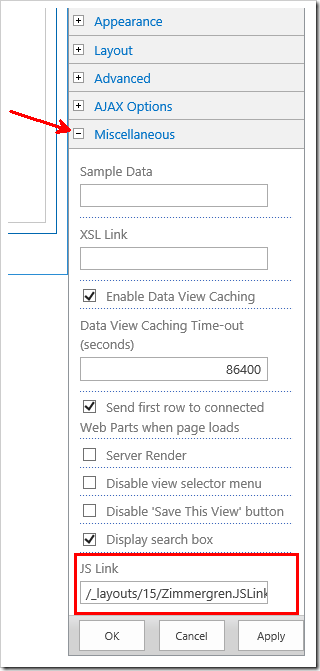
2) Edit page and edit webpart there is misscellaneous option ---expand that
only in App-Part this miscellaneous option available
Why the JSLink
Refer:
1) https://social.technet.microsoft.com/wiki/contents/articles/37684.sharepoint-2013-jslink-client-side-rendering.aspx
2) https://zimmergren.net/sp-2013-using-the-spfield-jslink-property-to-change-the-way-your-field-is-rendered-in-sharepoint-2013/
2) Edit page and edit webpart there is misscellaneous option ---expand that
only in App-Part this miscellaneous option available
Why the JSLink
Refer:
1) https://social.technet.microsoft.com/wiki/contents/articles/37684.sharepoint-2013-jslink-client-side-rendering.aspx
2) https://zimmergren.net/sp-2013-using-the-spfield-jslink-property-to-change-the-way-your-field-is-rendered-in-sharepoint-2013/


No comments:
Post a Comment